
blueprints.tendon module#
Tendons#
Tendons can be used to string together multiple Things. The can provide additional
structural stability or connect otherwise kinetically distinct Things. In Mujoco,
Tendon can be bound to Sites, Geoms and Joints according to certain constraints
limiting which Things can be bound and which Tendon attributes are passed into the
simulation. Tendons introduce cycles to the kinematic hierarchy and are therefore
treated specially with the Path.bind method replacing NodeThing.attach within
a special context manager.
Joint (Fixed) Tendons#
Joint Tendons are the simplest usecase since they only use a reduced set of attributes and do not support spliting paths into pulleys. The attributes allowed for Joint Tendons are:
namemarginspringlength
We first create some example Things.
>>> world = blue.World()
>>> body  = blue.Body(geoms=blue.geoms.Sphere(), # introduces mass to Body
>>>                   joints=blue.joints.Hinge())
>>> world.attach(body.shift(x=0, name='A'),
>>>              body.shift(x=3, name='B'),
>>>              body.shift(x=6, name='C'))
>>> tendon = blue.Tendon()
To bind the Joints to the tendon we first grab them from the world and then bind them to the tendon path within the Tendons context. When we bind a Joint to a Tendon, a coefficient must be specified weighing the interaction strength between Tendon and Joint.
>>> jA = world.bodies['A'].joints[0]
>>> jB = world.bodies['B'].joints[0]
>>> jC = world.bodies['C'].joints[0]
>>> with tendon as path:
>>>      path.bind(jA, coef=1.)
>>>      path.bind(jB, coef=2.)
>>>      path.bind(jC, coef=1.)
>>> with tendon as path:
>>>      path.bind(jA, jB, jC, coef=[1.0, 2.0, 1.0])
The resulting XML is split into the normal kinematic tree and the Tendon referencing its bound Things via name attribute.
<tendon>
        <fixed name="anonymous_tendon">
                <joint joint="anonymous_hinge_(0)" coef="1.0" />
                <joint joint="anonymous_hinge_(1)" coef="2.0" />
                <joint joint="anonymous_hinge_(2)" coef="1.0" />
        </fixed>
</tendon>
Note
Keep in mind that Fixed Joint Tendons do not support width and are hence invisible.
<worldbody>
        <body name="A">
                <joint type="hinge" name="anonymous_hinge_(0)" axis="0.0 0.0 1.0" />
                <geom size="1.0" type="sphere" name="anonymous_sphere_(0)" />
        </body>
        <body pos="3.0 0.0 0.0" name="B">
                <joint type="hinge" name="anonymous_hinge_(1)" axis="0.0 0.0 1.0" />
                <geom size="1.0" type="sphere" name="anonymous_sphere_(1)"/>
        </body>
        <body pos="6.0 0.0 0.0" name="C">
                <joint type="hinge" name="anonymous_hinge_(2)" axis="0.0 0.0 1.0" />
                <geom size="1.0" type="sphere" name="anonymous_sphere_(2)"/>
        </body>
</worldbody>
Site/Geom (Spatial) Tendons#
Spatial Tendons are bind to Sites and Geoms and support path splitting. The following rules
must be satisfied for mujoco to accept the build.
Every path must start and end with a
Site.Every Tendon binding Sites/Geoms must not also bind Joints.
Lets build some example Things and bind them to a Tendon.
>>> body_A = blue.Body(sites=blue.sites.Sphere(radius=0.5)).shift(x=-3, name='A')
>>> body_B = blue.Body(geoms=blue.geoms.Sphere(radius=0.5),
>>>                    sites=blue.sites.Sphere(radius=0.5).shift(z=3), name='B')
>>> body_C = blue.Body(sites=blue.sites.Sphere(radius=0.5)).shift(x=3, name='C')
>>> world.attach(body_A, body_C, body_B)
>>> tendon = blue.Tendon(width=0.1)
When binding a Geom to a Tendon, an optional side_site argument may be
specified. If the Tendon runs through the Geom at the begining of the Mujoco simulation,
it is snapped out on the side of the specified side_site.
>>> sA = world.bodies['A'].sites[0]
>>> sB = world.bodies['B'].sites[0]
>>> gB = world.bodies['B'].geoms[0]
>>> sC = world.bodies['C'].sites[0]
>>> with tendon as path:
>>>      path.bind(sA)
>>>      path.bind(gB, side_site=sB)
>>>      path.bind(sC)
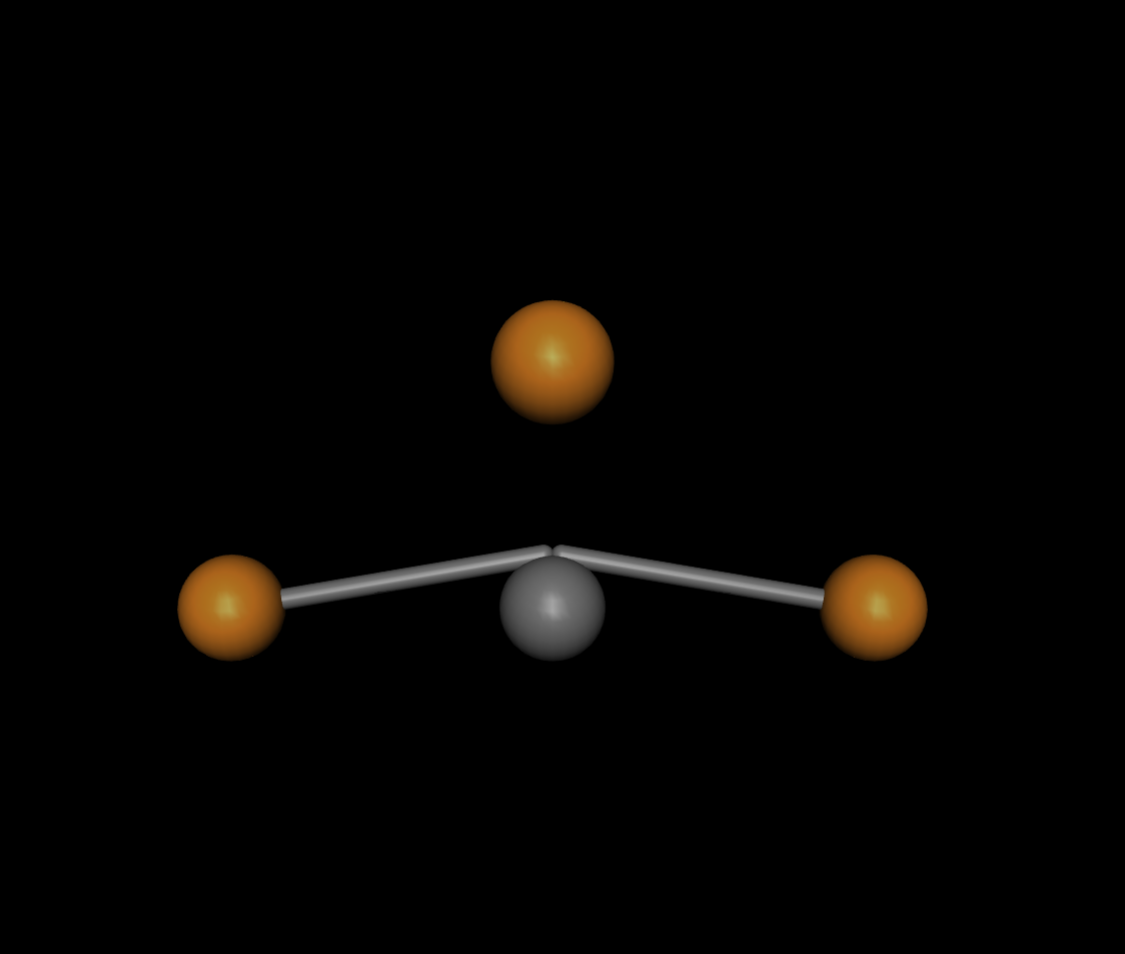
The resulting XML structure are separated into the cyclical references in the header of the Mujoco XML and its components in the normal kinematic hierarchy.
<tendon>
        <spatial width="0.1" name="anonymous_tendon">
                <site site="anonymous_sphere_(0)" />
                <geom geom="anonymous_sphere" sidesite="anonymous_sphere_(2)" />
                <site site="anonymous_sphere_(1)" />
        </spatial>
</tendon>
<worldbody>
        <body pos="-3.0 0.0 0.0" name="A">
                <site size="0.5 0.0 0.0" type="sphere" name="anonymous_sphere_(0)" />
        </body>
        <body pos="3.0 0.0 0.0" name="C">
                <site size="0.5 0.0 0.0" type="sphere" name="anonymous_sphere_(1)" />
        </body>
        <body name="B">
                <geom size="0.5" type="sphere" name="anonymous_sphere" />
                <site size="0.5 0.0 0.0" type="sphere" pos="0.0 0.0 3.0" name="anonymous_sphere_(2)" />
        </body>
</worldbody>
Path Splitting#
Mujoco supports pullies which split a path into multiple subpaths. The forces acting on each subpath are distributed proportionally. The begining of a new path is not necessarily directly connected to end of the parent path.
>>> world   = blue.World()
>>> body_A  = blue.Body(pos=[0, 0, 0], sites=blue.sites.Sphere(radius=0.5))
>>> body_B  = blue.Body(pos=[2, 0, 0], sites=blue.sites.Sphere(radius=0.5))
>>> body_C1 = blue.Body(pos=[4,-2, 0], sites=blue.sites.Sphere(radius=0.5))
>>> body_C2 = blue.Body(pos=[4, 2, 0], sites=blue.sites.Sphere(radius=0.5))
>>> body_D1 = blue.Body(pos=[6,-2, 0], sites=blue.sites.Sphere(radius=0.5))
>>> body_D2 = blue.Body(pos=[6, 0, 0], sites=blue.sites.Sphere(radius=0.5))
>>> body_D3 = blue.Body(pos=[6, 4, 0], sites=blue.sites.Sphere(radius=0.5))
>>> tendon  = blue.Tendon(width=0.1)
Using the method split a pulley is introduced that splits the path into n
branches. A branch path can also be split.
>>> with tendon as path:
>>>      path.bind(body_A.sites)
>>>      path.bind(body_B.sites)
>>>      path_1, path_2, path_3 = path.split(3)
>>>      # PATH ONE
>>>      path_1.bind(body_B.sites)
>>>      path_1.bind(body_C1.sites)
>>>      path_1.bind(body_D1.sites)
>>>      # PATH TWO
>>>      path_2.bind(body_C2.sites)
>>>      path_2.bind(body_D2.sites)
>>>      # PATH THREE
>>>      path_3.bind(body_C2.sites)
>>>      path_3.bind(body_D3.sites)
The example above introduces a pulley with the divisor 3. The path bindings can be seen in the
following image from left to right with path_1 on the bottom and path_2 and path_3 ontop both
sharing the same initial Site.
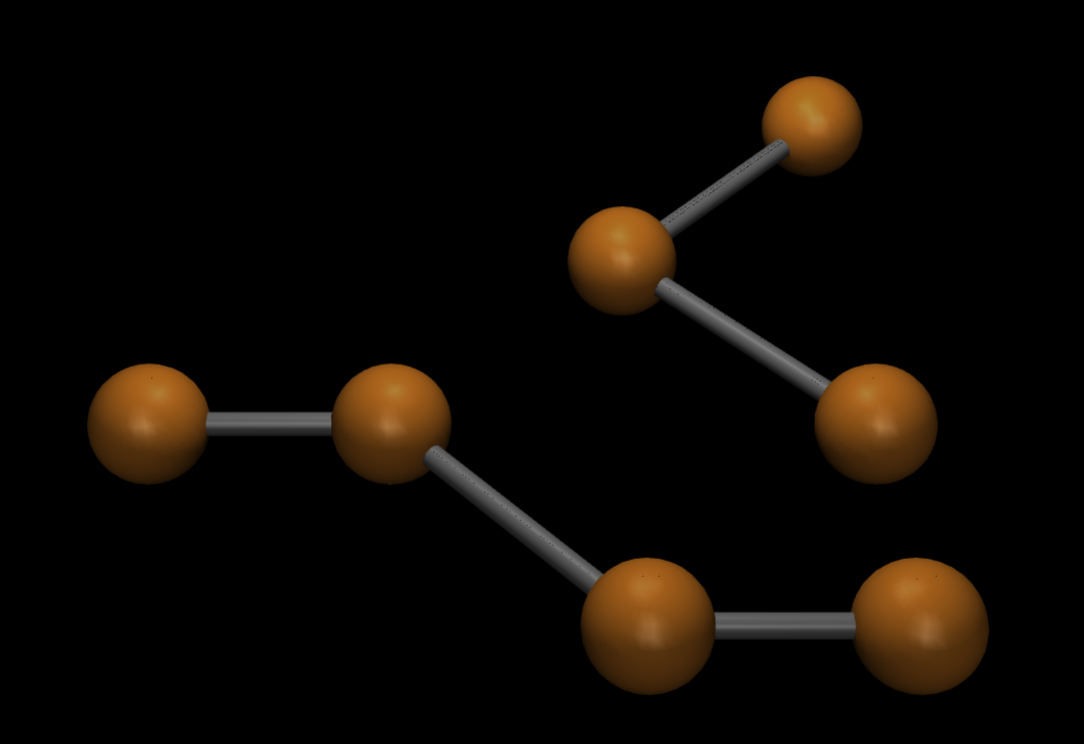
The resulting XML structures are:
<tendon>
        <spatial width="0.1" name="anonymous_tendon">
                <site site="anonymous_sphere_(0)" />
                <site site="anonymous_sphere_(1)" />
                <pulley divisor="3" />
                <site site="anonymous_sphere_(3)" />
                <site site="anonymous_sphere_(6)" />
                <pulley divisor="3" />
                <site site="anonymous_sphere_(3)" />
                <site site="anonymous_sphere_(5)" />
                <pulley divisor="3" />
                <site site="anonymous_sphere_(1)" />
                <site site="anonymous_sphere_(2)" />
                <site site="anonymous_sphere_(4)" />
        </spatial>
</tendon>
<worldbody>
        <body name="anonymous_body_(0)">
                <site size="0.5 0.0 0.0" type="sphere" name="anonymous_sphere_(0)" />
        </body>
        <body pos="2.0 0.0 0.0" name="anonymous_body_(1)">
                <site size="0.5 0.0 0.0" type="sphere" name="anonymous_sphere_(1)" />
        </body>
        <body pos="4.0 -2.0 0.0" name="anonymous_body_(2)">
                <site size="0.5 0.0 0.0" type="sphere" name="anonymous_sphere_(2)" />
        </body>
        <body pos="4.0 2.0 0.0" name="anonymous_body_(3)">
                <site size="0.5 0.0 0.0" type="sphere" name="anonymous_sphere_(3)" />
        </body>
        <body pos="6.0 -2.0 0.0" name="anonymous_body_(4)">
                <site size="0.5 0.0 0.0" type="sphere" name="anonymous_sphere_(4)" />
        </body>
        <body pos="6.0 0.0 0.0" name="anonymous_body_(5)">
                <site size="0.5 0.0 0.0" type="sphere" name="anonymous_sphere_(5)" />
        </body>
        <body pos="6.0 4.0 0.0" name="anonymous_body_(6)">
                <site size="0.5 0.0 0.0" type="sphere" name="anonymous_sphere_(6)" />
        </body>
</worldbody>
Copies of Tendons#
Copying Tendons takes special attention since Tendons introduce cyclical references (i.e. multiple children of a NodeThing
can be bound to the same Tendon). Therefore Tendons only get copied when the (root) Thing copied by the user has as its descendants all references
of the Tendon.
Let’s see an example of this:
>>> tendon = blue.Tendon(width=0.1)
>>> root = blue.Body(name='root')
>>> body_site = blue.Body(sites=blue.sites.Sphere(radius=0.5))
>>> root.attach(body_site.shift(x=0, name='A'),
>>>             body_site.shift(x=2, name='B'))
>>> A = root.bodies['A']
>>> B = root.bodies['B']
>>> C = body_site.shift(x=4, name='C')
>>> with tendon as path:
>>>      path.bind(A.sites)
>>>      path.bind(B.sites)
>>>      path.bind(C.sites)
We have created three bodies with sites (A, B, C) that are bound together with a Tendon.
But only A and B are attached to root, while C is not. If both are attached to the World
without creating a copy, they world will contain the tendon.
>>> world.attach(root, C, copy=False)
<tendon>
        <spatial width="0.1" name="anonymous_tendon">
                <site site="anonymous_sphere_(0)" />
                <site site="anonymous_sphere_(1)" />
                <site site="anonymous_sphere_(2)" />
        </spatial>
</tendon>
<worldbody>
        <body name="root">
                <body name="A">
                        <site size="0.5 0.0 0.0" type="sphere" name="anonymous_sphere_(0)" />
                </body>
                <body pos="2.0 0.0 0.0" name="B">
                        <site size="0.5 0.0 0.0" type="sphere" name="anonymous_sphere_(1)" />
                </body>
        </body>
        <body pos="4.0 0.0 0.0" name="C">
                <site size="0.5 0.0 0.0" type="sphere" name="anonymous_sphere_(2)" />
        </body>
</worldbody>
If we however create a copy of root and C separately the Tendon will be discarded, since neither
root nor C contain all refferences of the Tendon as their descendants (the references of the Tendon
are the bound Sites "anonymous_sphere_(0)", "anonymous_sphere_(1)" and "anonymous_sphere_(2)").
>>> world.attach(root, C, copy=True)
</tendon>
<worldbody>
        <body name="root">
                <body name="A">
                        <site size="0.5 0.0 0.0" type="sphere" name="anonymous_sphere_(0)" />
                </body>
                <body pos="2.0 0.0 0.0" name="B">
                        <site size="0.5 0.0 0.0" type="sphere" name="anonymous_sphere_(1)" />
                </body>
        </body>
        <body pos="4.0 0.0 0.0" name="C">
                <site size="0.5 0.0 0.0" type="sphere" name="anonymous_sphere_(2)" />
        </body>
</worldbody>
- class blueprints.tendon.Tendon[source]#
Bases:
TendonType,NodeThing,ColoredThing,FocalThing- __init__(name=None, limited=None, act_force_limited=None, min_length=0.0, max_length=0.0, min_act_force=0.0, max_act_force=0.0, frictionloss=0.0, width=0.003, color=None, stiffness=0.0, damping=0.0, armature=0.0, **kwargs)[source]#
Some attribute descriptions are taken from Mujoco.
- Parameters:
limited (
bool | None) – Sets whether length limits constraints are imposed on the mujoco solver. Leaving this argument as None (recommended) enables autolimits derived from the other attributes.act_force_limited (
bool | None) – This argument is the equivalent to limited for actuator forces.min_length (
int | float) – Minimal length of Tendonmax_length (
int | float) – Maximal length of Tendonmin_act_force (
int | float) – Minimal force allowed to act on Tendonmax_act_force (
int | float) – Maximal force allowed to act on Tendonfrictionloss (
int | float) – Friction loss caused by dry friction. This value should be positive.width (
int | float) – Crosssection radius of the Tendonstiffness (
int | float) – If set to a positive value it acts as a Spring coefficient.damping (
int | float) – If set to a positive value it acts as a Damping coefficient.armature (
int | float) – Inertia associated with changes in tendon lengthname (str | None)
color (object | None)
- Return type:
None
- attach(*items, copy=False)[source]#
Attachements are not allowed for Tendons. Use
Path.bind()instead.- Return type:
None
- property actuatorfrclimited: bool | None#
Indicates whether the Actuator forces applied are limited.
- Returns:
In the attribute is None, the value is set to
auto.- Return type:
bool | None
- property range: ndarray#
The length range of the Tendon.
- Returns:
The two entries indicate minimum and maximum Tendon length.
- Return type:
np.ndarray
- property actuatorfrcrange: ndarray#
The Actuator force range of the Tendon.
- Returns:
The two entries indicate minimum and maximum Actuator force applied to the Tendon.
- Return type:
np.ndarray
- property max_length: float#
Changing this value results in a change in the first component of
range.The user should make sure, that the initial length of the tendon as computed by the distance between its bound Things does not exeed this attribute.
- Returns:
Maximum length of the Tendon
- Return type:
float
- property min_length: float#
Changing this value results in a change in the second component of
range.- Returns:
Minimum length of the Tendon
- Return type:
float
- property max_act_force: float#
Changing this value results in a change in the first component of
actuatorfrcrange.- Returns:
Maximum force applicable by an
Actuator- Return type:
float
- property min_act_force: float#
Changing this value results in a change in the second component of
actuatorfrcrange.- Returns:
Minimum force applicable by an
Actuator- Return type:
float
- property limited: bool | None#
Indicates whether the Tendon length is limited by
range.- Returns:
In the attribute is None, the value is set to
auto.- Return type:
bool | None
- property act_force_limited: bool | None#
Indicates whether the Actuator forces applied are limited.
- Returns:
In the attribute is None, the value is set to
auto.- Return type:
bool | None
- property frictionloss: float#
Friction loss caused by dry friction.
- Returns:
To enable friction loss, set this attribute to a positive value.
- Return type:
float
- property width: float#
This attribute is purely cosmetical.
- Returns:
Width of the Tendon.
- Return type:
föoat
- property stiffness: float#
A positive value generates a spring force (linear in position) acting along the Tendon.
- Returns:
Stiffness of the Tendon
- Return type:
float
- property damping: float#
A positive value generates a damping force (linear in velocity) acting along the tendon. If possible,
Joint.dampingshould be used for stability.- Returns:
Tendon dampin.
- Return type:
float
- property armature: float#
Setting this attribute to a positive value \(m\) adds a kinetic energy term \(\frac{1}{2}mv^2\), where \(v\) is the tendon velocity.
- Returns:
Inertia associated with changes in Tendon length
- Return type:
float
- class blueprints.tendon.Path[source]#
Bases:
PathTypePaths are used to specify the
<pulley>element in Mujoco. A path can be strung along multipleSites,JointsandGeoms. Every path must start and end with a Site and every Geom must be sandwitched between two Sites.- __init__(tendon)[source]#
Warning
This class is not to be instantiated by the user directly. Use the contextmanager
Tendon.__enter__()instead (see above).
- bind(*things, side_site=None, coef=None)[source]#
Binding is performed in order. If a
side_siteis specified only one Geom to be bound can be passed.- Parameters:
*things (
list [ blue.ThingType ]) – The Sites and Geoms to be bound to a Tendon pathside_site (
blue.SiteType | None) – A side Site for a Geom specifies to which side of the geom the Tendon should snap out if passing through the Geom initially.coef (
int | float | list [ int | float] | None) – Numeric coefficients for Joints. The argument must have the same shape as *things.
- Return type:
None
- split(number)[source]#
If a pulley should split the Tendon into \(n\)
Paths, this method handles the split. A split Path does not necessarily start at the last element of its parent Path. Once split, a Path can no longer bind Things.- Parameters:
number (
int) – The number of new Paths- Returns:
The new Paths connected through a pulley
- Return type:
tuple [ blue.PathType ]