
blueprints.geoms module#
- class blueprints.geoms.BaseGeom[source]#
Bases:
GeomType,NodeThing,MoveableThing,ColoredThingGeoms introduce physical matter into the simulation. For different Geom shapes individual Geom classes are available, with shape depended size attributes. All other attributes are specified in
BaseGeom.Note
Though units are not bound to one specific system of measurements, it is highly recommended to use MKS, since all defaults are defined based on meters, kilograms and seconds and most mujoco models online also use the metric system. If you want to switch from the imperial to the metric system the following resource might be of interest to convert units from imperial to metric. If you insist on using imperial units, take a look at the following resource to convert units from metric to imperial.
Most attribute descriptions are partially taken from Mujoco.
- __init__(pos=[0.0, 0.0, 0.0], alpha=0, beta=0, gamma=0, material=None, mass=None, density=1000.0, margin=0.0, gap=0.0, sliding_friction=1, torsional_friction=0.005, rolling_friction=0.0001, shellinertia=None, color=None, name=None, x=None, y=None, z=None, quat=None, **kwargs)[source]#
- Parameters:
pos (
list[int | float] | np.ndarray | None, optional) – Represents the position of the object. Changing this attribute also changes the propertiesx,yandz.alpha (
int | float | None, optional) – (Improper) euler angle of rotation around the x-axis in radian. Changing this value also changes theeulerproperty.beta (
int | float | None, optional) – (Improper) euler angle of rotation around the y-axis in radian. Changing this value also changes theeulerproperty.gamma (
int | float | None, optional) – (Improper) euler angle of rotation around the z-axis in radian. Changing this value also changes theeulerproperty.material (
blue.MaterialType, optional) – TheMaterialof the Geom. :class:`Textures <blueprints.texture.BaseTexture> are applied via Materials.density (
int | float | None, optional) – Material density used to compute the geom mass and inertia. The computation is based on the geom shape and the assumption of uniform density. The internal default of 1000 is the density of water in SI units. This attribute is used only when the mass attribute above is unspecified.margin (
int | float | None, optional) – A contact is considered active only if the distance between the two geom surfaces is below margin-gap.gap (
int | float | None, optional) – This attribute is used to enable the generation of inactive contacts, i.e., contacts that are ignored by the constraint solver but are included in mjData.contact for the purpose of custom computations. When this value is positive, geom distances between margin and margin-gap correspond to such inactive contacts.mass (
int | float | None, optional) – If this attribute is specified, the density attribute below is ignored and the geom density is computed from the given mass, using the geom shape and the assumption of uniform density. The computed density is then used to obtain the geom inertia. Recall that the geom mass and inertia are only used during compilation, to infer the body mass and inertia if necessary.shellinertia (
bool | None, optional) – If true, the geom’s inertia is computed assuming that all the mass is concentrated on the boundary. In this case density is interpreted as surface density rather than volumetric density.sliding_friction (
int | float, optional) – Friction parameter for sliding used to compute the forces on contact pairs.torsional_friction (
int | float, optional) – Friction parameter for torsion used to compute the forces on contact pairs.rolling_friction (
int | float, optional) – Friction parameter for rolling used to compute the forces on contact pairs.color (
blue.ColorType) – The color of the Geom. For a detailed description see :class:`Color `name (
str | None, optional) – The user specified name might potentially be altered to avoid a naming conflict by appending an enumeration scheme.x (
int | float |np.int32 | np.int64 | np.float32 | np.float64 | None, optional) – If pos is not specified, this argument sets the X position coordinate.y (
int | float |np.int32 | np.int64 | np.float32 | np.float64 | None, optional) – If pos is not specified, this argument sets the Y position coordinate.z (
int | float |np.int32 | np.int64 | np.float32 | np.float64 | None, optional) – If pos is not specified, this argument sets the Z position coordinate.quat (
list [ int | float ] | np.ndarray | None, optional) – If set, the quaternion orientation overwrites the euler anglesalpha,betaandgamma.**kwargs – Keyword arguments are passed to
super().__init__.
- property type: str#
This is a derived attribute, which is used to specify the
typeattribute in the mujocogeomtag.- Returns:
The type is the lower case name of the Geom class.
- Return type:
str
- property material#
Materials can be used to specify reflective properties of a Geom, as well as to apply
Texturesto them.- Returns:
The Material of the Geom
- Return type:
blue.MaterialType
- property friction: ndarray#
Contact friction parameters for dynamically generated contact pairs. The first number is the sliding friction, acting along both axes of the tangent plane. The second number is the torsional friction, acting around the contact normal. The third number is the rolling friction, acting around both axes of the tangent plane.
- Returns:
Individual components are found in
sliding_friction,torsional_frictionandrolling_friction.- Return type:
np.ndarray
- property mass: float#
If this attribute is specified, the density attribute below is ignored and the geom density is computed from the given mass, using the geom shape and the assumption of uniform density. The computed density is then used to obtain the geom inertia. Recall that the geom mass and inertia are only used during compilation, to infer the body mass and inertia if necessary.
Unit defaults are set in SI units, but the physical properties can in principle be interpreted in any system of measurements.
- Returns:
The default unit convention is kilogram.
- Return type:
float
- property density: float#
Unit defaults are set in SI units, but the physical properties can in principle be interpreted in any system of measurements.
Material density used to compute the geom mass and inertia. The computation is based on the geom shape and the assumption of uniform density. The internal default of 1000 is the density of water in SI units. This attribute is used only when the mass attribute above is unspecified.
- Returns:
Density is either volumetric if
shellinertiais false, otherwise its planar.- Return type:
float
- property shellinertia: bool#
If shellinertia is True all mass will be distributed along the surface of the object. Changing this attribute also changes the effect of
densityfrom volumetric to planar.- Returns:
Indicates whether mass is concentrated on the surface.
- Return type:
bool
- property margin: float#
Margin defines the minimum distance used to detect a contact.
- Returns:
Default units are interpreted in meters.
- Return type:
float
- property gap: float#
Gap defines the gap on minimum distance used to detect a contact.
- Returns:
Default units are interpreted in meters.
- Return type:
float
- property sliding_friction: float#
Friction parameter for sliding used to computed the forces on contact pairs.
- Returns:
First component of
friction.- Return type:
float
- class blueprints.geoms.Capsule[source]#
Bases:
CapsuleGeomType,BaseTube,BaseGeomCapsules consist of a cylinder with two half spheres at its ends. It can either be constructed from its standard constructor for position, orientation, radius and length, or with the
blueprints.tube.BaseTube()constructor. For a detailed description seeblueprints.tube.BaseTube.Standard constructor:#>>> geom = blue.geoms.Capsule(alpha=TAU/8, length=3) >>> geom.head array([ 0. 1.06066017 -1.06066017], dtype=np.float32) >>> geom.tail array([ 0. -1.06066017 1.06066017], dtype=np.float32)
From points constructor:#>>> geom = blue.geoms.Capsule.from_points([0, -1, 4], [2, 1, 0], radius=0.5) >>> geom.pos array([1. 0. 2.], dtype=np.float32) >>> geom.alpha, geom.beta, geom.gamma -2.6779450445889874 0.420534335283965 0.6847192030022825 >>> geom.length 4.898979485566356
- head#
The first end of this Geoms. If it was defined by the
blueprints.tube.BaseTube()constructor,headis the first argument given.- Type:
np.ndarra
- tail#
The second end of this Geoms. If it was defined by the
blueprints.tube.BaseTube()constructor,tailis the second argument given.- Type:
np.ndarra
- __init__(pos=[0.0, 0.0, 0.0], radius=1.0, length=1.0, alpha=0.0, beta=0.0, gamma=0.0, margin=0.0, gap=0.0, material=None, color=None, name=None, x=None, y=None, z=None, quat=None, **kwargs)[source]#
- Parameters:
pos (
list[int | float] | np.ndarray | None, optional) – Represents the position of the object. Changing this attribute also changes the propertiesx,yandz.radius (
int | float, optional) – Represents the radius of the cylinder and the two half spheres.length (
int | float, optional) – The length of the cylinder.alpha (
int | float | None, optional) – (Improper) euler angle of rotation around the x-axis in radian. Changing this value also changes theeulerproperty.beta (
int | float | None, optional) – (Improper) euler angle of rotation around the y-axis in radian. Changing this value also changes theeulerproperty.gamma (
int | float | None, optional) – (Improper) euler angle of rotation around the z-axis in radian. Changing this value also changes theeulerproperty.margin (
int | float | None, optional) – A contact is considered active only if the distance between the two geom surfaces is below margin-gap.gap (
int | float | None, optional) – This attribute is used to enable the generation of inactive contacts, i.e., contacts that are ignored by the constraint solver but are included in mjData.contact for the purpose of custom computations. When this value is positive, geom distances between margin and margin-gap correspond to such inactive contacts.material (
blue.MaterialType, optional) – TheMaterialof the Geom. :class:`Textures <blueprints.texture.BaseTexture> are applied via Materials.color (
object) – The color of the Geom. SeeColorfor a detailed description.name (
str | None, optional) – The user specified name might potentially be altered to avoid a naming conflict by appending an enumeration scheme.x (
int | float |np.int32 | np.int64 | np.float32 | np.float64 | None, optional) – If pos is not specified, this argument sets the X position coordinate.y (
int | float |np.int32 | np.int64 | np.float32 | np.float64 | None, optional) – If pos is not specified, this argument sets the Y position coordinate.z (
int | float |np.int32 | np.int64 | np.float32 | np.float64 | None, optional) – If pos is not specified, this argument sets the Z position coordinate.quat (
list [ int | float ] | np.ndarray | None, optional) – If set, the quaternion orientation overwrites the euler anglesalpha,betaandgamma.**kwargs – Keyword arguments are passed to
super().__init__.
- property size: ndarray#
Note
In mujoco half lengths are used instead of true lengths of objects. This makes distance calculations easier, but we find that it is overall more confusing then beneficial which is why blueprints uses proper lengths. Conversion is handled in the background, such that users only need to specify true lengths.
- Returns:
The size defines the radius and half length of the capsule.
- Return type:
np.ndarray
- class blueprints.geoms.Cylinder[source]#
Bases:
CylinderGeomType,BaseTube,BaseGeomCylinders can either be constructed from their standard constructor for position, orientation, radius and length, or with the
blueprints.tube.BaseTube()constructor. For a detailed description seeblueprints.tube.BaseTube.Standard constructor:#>>> geom = blue.geoms.Cylinder(alpha=TAU/8, length=3) >>> geom.head array([ 0. 1.06066017 -1.06066017], dtype=np.float32) >>> geom.tail array([ 0. -1.06066017 1.06066017], dtype=np.float32)
From points constructor:#>>> geom = blue.geoms.Cylinder.from_points([0, -1, 4], [2, 1, 0], radius=0.5) >>> geom.pos array([1. 0. 2.], dtype=np.float32) >>> geom.alpha, geom.beta, geom.gamma -2.6779450445889874 0.420534335283965 0.6847192030022825 >>> geom.length 4.898979485566356
- head#
The first end of this Geoms. If it was defined by the
blueprints.tube.BaseTube()constructor,headis the first argument given.- Type:
np.ndarra
- tail#
The second end of this Geoms. If it was defined by the
blueprints.tube.BaseTube()constructor,tailis the second argument given.- Type:
np.ndarra
- __init__(pos=[0.0, 0.0, 0.0], radius=1.0, length=1.0, alpha=0.0, beta=0.0, gamma=0.0, margin=0.0, gap=0.0, material=None, color=None, name=None, x=None, y=None, z=None, quat=None, **kwargs)[source]#
- Parameters:
pos (
list[int | float] | np.ndarray | None, optional) – Represents the position of the object. Changing this attribute also changes the propertiesx,yandz.radius (
int | float, optional) – Represents the radius of the cylinder and the two half spheres.length (
int | float, optional) – The length of the cylinder.alpha (
int | float | None, optional) – (Improper) euler angle of rotation around the x-axis in radian. Changing this value also changes theeulerproperty.beta (
int | float | None, optional) – (Improper) euler angle of rotation around the y-axis in radian. Changing this value also changes theeulerproperty.gamma (
int | float | None, optional) – (Improper) euler angle of rotation around the z-axis in radian. Changing this value also changes theeulerproperty.margin (
int | float | None, optional) – A contact is considered active only if the distance between the two geom surfaces is below margin-gap.gap (
int | float | None, optional) – This attribute is used to enable the generation of inactive contacts, i.e., contacts that are ignored by the constraint solver but are included in mjData.contact for the purpose of custom computations. When this value is positive, geom distances between margin and margin-gap correspond to such inactive contacts.material (
blue.MaterialType, optional) – TheMaterialof the Geom. :class:`Textures <blueprints.texture.BaseTexture> are applied via Materials.color (
object) – The color of the Geom. SeeColorfor a detailed description.name (
str | None, optional) – The user specified name might potentially be altered to avoid a naming conflict by appending an enumeration scheme.x (
int | float |np.int32 | np.int64 | np.float32 | np.float64 | None, optional) – If pos is not specified, this argument sets the X position coordinate.y (
int | float |np.int32 | np.int64 | np.float32 | np.float64 | None, optional) – If pos is not specified, this argument sets the Y position coordinate.z (
int | float |np.int32 | np.int64 | np.float32 | np.float64 | None, optional) – If pos is not specified, this argument sets the Z position coordinate.quat (
list [ int | float ] | np.ndarray | None, optional) – If set, the quaternion orientation overwrites the euler anglesalpha,betaandgamma.**kwargs – Keyword arguments are passed to
super().__init__.
- property size: ndarray#
Note
In mujoco half lengths are used instead of true lengths of objects. This makes distance calculations easier, but we find that it is overall more confusing then beneficial which is why blueprints uses proper lengths. Conversion is handled in the background, such that users only need to specify true lengths.
- Returns:
The size defines the radius and half length of the cylinder.
- Return type:
np.ndarray
- class blueprints.geoms.Box[source]#
Bases:
BoxGeomType,BaseTube,BaseGeomBoxes can either be constructed from their standard constructor for position, orientation, and x-, y-, z-length, or with the
blueprints.tube.BaseTube()constructor. For a detailed description seeblueprints.tube.BaseTube.Standard constructor:#>>> geom = blue.geoms.Box(x_length=2, y_length=4, z_length=1) >>> geom.head array([ 0. 0. -0.5], dtype=np.float32) >>> geom.tail array([ 0. 0. 0.5], dtype=np.float32)
From points constructor:#>>> geom = blue.geoms.Box.from_points([4, 0,-2], [2, 4, 0], radius=0.5) >>> geom.pos array([ 3. 2. -1.], dtype=np.float32) >>> geom.alpha, geom.beta, geom.gamma -1.1071487177940904 -0.4205343352839653 0.20135792079032988 >>> geom.x_length, geom.y_length, geom.z_length 0.5 0.5 4.898979485566356
- head#
The first end of this Geoms. If it was defined by the
blueprints.tube.BaseTube()constructor,headis the first argument given.- Type:
np.ndarra
- tail#
The second end of this Geoms. If it was defined by the
blueprints.tube.BaseTube()constructor,tailis the second argument given.- Type:
np.ndarra
- __init__(pos=[0.0, 0.0, 0.0], x_length=1.0, y_length=1.0, z_length=1.0, alpha=0.0, beta=0.0, gamma=0.0, margin=0.0, gap=0.0, material=None, color=None, name=None, x=None, y=None, z=None, quat=None, **kwargs)[source]#
- Parameters:
pos (
list[int | float] | np.ndarray | None, optional) – Represents the position of the object. Changing this attribute also changes the propertiesx,yandz.x_length (
int | float, optional) – The true length of the Box along the x-axis.y_length (
int | float, optional) – The true length of the Box along the y-axis.z_length (
int | float, optional) – The true length of the Box along the z-axis.alpha (
int | float | None, optional) – (Improper) euler angle of rotation around the x-axis in radian. Changing this value also changes theeulerproperty.beta (
int | float | None, optional) – (Improper) euler angle of rotation around the y-axis in radian. Changing this value also changes theeulerproperty.gamma (
int | float | None, optional) – (Improper) euler angle of rotation around the z-axis in radian. Changing this value also changes theeulerproperty.margin (
int | float | None, optional) – A contact is considered active only if the distance between the two geom surfaces is below margin-gap.gap (
int | float | None, optional) – This attribute is used to enable the generation of inactive contacts, i.e., contacts that are ignored by the constraint solver but are included in mjData.contact for the purpose of custom computations. When this value is positive, geom distances between margin and margin-gap correspond to such inactive contacts.material (
blue.MaterialType, optional) – TheMaterialof the Geom. :class:`Textures <blueprints.texture.BaseTexture> are applied via Materials.color (
object) – The color of the Geom. SeeColorfor a detailed description.name (
str | None, optional) – The user specified name might potentially be altered to avoid a naming conflict by appending an enumeration scheme.x (
int | float |np.int32 | np.int64 | np.float32 | np.float64 | None, optional) – If pos is not specified, this argument sets the X position coordinate.y (
int | float |np.int32 | np.int64 | np.float32 | np.float64 | None, optional) – If pos is not specified, this argument sets the Y position coordinate.z (
int | float |np.int32 | np.int64 | np.float32 | np.float64 | None, optional) – If pos is not specified, this argument sets the Z position coordinate.quat (
list [ int | float ] | np.ndarray | None, optional) – If set, the quaternion orientation overwrites the euler anglesalpha,betaandgamma.**kwargs – Keyword arguments are passed to
super().__init__.
- property size: ndarray#
Note
In mujoco half lengths are used instead of true lengths of objects. This makes distance calculations easier, but we find that it is overall more confusing then beneficial which is why blueprints uses proper lengths. Conversion is handled in the background, such that users only need to specify true lengths.
- Returns:
The size defines the half lengths of the Box.
- Return type:
np.ndarray
- class blueprints.geoms.Plane[source]#
Bases:
PlaneGeomType,BaseGeomPlanes can either be finite or infinite. They are normal to the Z-axis of their frame of reference and the outside of the plane lies in the positive Z-axis. The inside of the plane is rendered semi transparent. Finite Planes are rendered as rectangles with size specified in
x_lengthy_length. If those size parameters are set to zero or are set negative, the plain is instead infinite. Thespacingdefines the size of grid subdivisions which are used in rendering.- __init__(pos=[0.0, 0.0, 0.0], x_length=0.0, y_length=0.0, spacing=1.0, alpha=0.0, beta=0.0, gamma=0.0, margin=0.0, gap=0.0, material=None, color=None, name=None, x=None, y=None, z=None, quat=None, **kwargs)[source]#
- Parameters:
pos (
list[int | float] | np.ndarray | None, optional) – Represents the position of the object. Changing this attribute also changes the propertiesx,yandz.x_length (
int | float, optional) – Length of the X-axis side. If both lengths are set to zero or negative the Plane is infinite.y_length (
int | float, optional) – Length of the Y-axis side. If both lengths are set to zero or negative the Plane is infinite.spacing (
int | float, optional) – Spacing between the grid subdivisions.alpha (
int | float | None, optional) – (Improper) euler angle of rotation around the x-axis in radian. Changing this value also changes theeulerproperty.beta (
int | float | None, optional) – (Improper) euler angle of rotation around the y-axis in radian. Changing this value also changes theeulerproperty.gamma (
int | float | None, optional) – (Improper) euler angle of rotation around the z-axis in radian. Changing this value also changes theeulerproperty.margin (
int | float | None, optional) – A contact is considered active only if the distance between the two geom surfaces is below margin-gap.gap (
int | float | None, optional) – This attribute is used to enable the generation of inactive contacts, i.e., contacts that are ignored by the constraint solver but are included in mjData.contact for the purpose of custom computations. When this value is positive, geom distances between margin and margin-gap correspond to such inactive contacts.material (
blue.MaterialType, optional) – TheMaterialof the Geom. :class:`Textures <blueprints.texture.BaseTexture> are applied via Materials.color (
object) – The color of the Geom. SeeColorfor a detailed description.name (
str | None, optional) – The user specified name might potentially be altered to avoid a naming conflict by appending an enumeration scheme.x (
int | float |np.int32 | np.int64 | np.float32 | np.float64 | None, optional) – If pos is not specified, this argument sets the X position coordinate.y (
int | float |np.int32 | np.int64 | np.float32 | np.float64 | None, optional) – If pos is not specified, this argument sets the Y position coordinate.z (
int | float |np.int32 | np.int64 | np.float32 | np.float64 | None, optional) – If pos is not specified, this argument sets the Z position coordinate.quat (
list [ int | float ] | np.ndarray | None, optional) – If set, the quaternion orientation overwrites the euler anglesalpha,betaandgamma.**kwargs – Keyword arguments are passed to
super().__init__.
- property size: ndarray#
Note
In mujoco half lengths are used instead of true lengths of objects. This makes distance calculations easier, but we find that it is overall more confusing then beneficial which is why blueprints uses proper lengths. Conversion is handled in the background, such that users only need to specify true lengths.
- Returns:
The first two components are half lengths for the X-axis and the Y-axis and the third is the spacing between grid subdivisions.
- Return type:
np.ndarray
- class blueprints.geoms.Sphere[source]#
Bases:
SphereGeomType,BaseGeomSpheres are defined via radius and position.
- radius#
The radius of the sphere
- Type:
float
- __init__(pos=[0.0, 0.0, 0.0], radius=1.0, alpha=0.0, beta=0.0, gamma=0.0, margin=0.0, gap=0.0, material=None, color=None, name=None, x=None, y=None, z=None, quat=None, **kwargs)[source]#
- Parameters:
pos (
list[int | float] | np.ndarray | None, optional) – Represents the position of the Thing. Changing this attribute also changes the propertiesx,yandz.radius (
int | float, optional) – The radius of the Sphere.alpha (
int | float | None, optional) – (Improper) euler angle of rotation around the x-axis in radian. Changing this value also changes theeulerproperty.beta (
int | float | None, optional) – (Improper) euler angle of rotation around the y-axis in radian. Changing this value also changes theeulerproperty.gamma (
int | float | None, optional) – (Improper) euler angle of rotation around the z-axis in radian. Changing this value also changes theeulerproperty.margin (
int | float | None, optional) – A contact is considered active only if the distance between the two geom surfaces is below margin-gap.gap (
int | float | None, optional) – This attribute is used to enable the generation of inactive contacts, i.e., contacts that are ignored by the constraint solver but are included in mjData.contact for the purpose of custom computations. When this value is positive, geom distances between margin and margin-gap correspond to such inactive contacts.material (
blue.MaterialType, optional) – TheMaterialof the Geom. :class:`Textures <blueprints.texture.BaseTexture> are applied via Materials.color (
object) – The color of the Geom. SeeColorfor a detailed description.name (
str | None, optional) – The user specified name might potentially be altered to avoid a naming conflict by appending an enumeration scheme.x (
int | float |np.int32 | np.int64 | np.float32 | np.float64 | None, optional) – If pos is not specified, this argument sets the X position coordinate.y (
int | float |np.int32 | np.int64 | np.float32 | np.float64 | None, optional) – If pos is not specified, this argument sets the Y position coordinate.z (
int | float |np.int32 | np.int64 | np.float32 | np.float64 | None, optional) – If pos is not specified, this argument sets the Z position coordinate.quat (
list [ int | float ] | np.ndarray | None, optional) – If set, the quaternion orientation overwrites the euler anglesalpha,betaandgamma.**kwargs – Keyword arguments are passed to
super().__init__.
- property size: ndarray#
Note
In mujoco half lengths are used instead of true lengths of objects. This makes distance calculations easier, but we find that it is overall more confusing then beneficial which is why blueprints uses proper lengths. Conversion is handled in the background, such that users only need to specify true lengths.
- Returns:
The only component of size is the radius, which is interpreted as meters by default parameters and convention.
- Return type:
np.ndarray
- class blueprints.geoms.Ellipsoid[source]#
Bases:
EllipsoidGeomType,BaseGeomEllipsoids are defined with via :attr:´x_radius`, :attr:´y_radius` and :attr:´z_radius`. The surface of the Ellipsoid contains the solutions to the equation:
\(\left( \frac{x}{r_x} \right)^2 + \left( \frac{y}{r_y} \right)^2 + \left( \frac{z}{r_z} \right)^2 = 1\)
- x_radius#
This attribute defines the radius for the X-axis.
- Type:
float
- y_radius#
This attribute defines the radius for the Y-axis.
- Type:
float
- z_radius#
This attribute defines the radius for the Z-axis.
- Type:
float
- __init__(pos=[0.0, 0.0, 0.0], x_radius=1.0, y_radius=2.0, z_radius=3.0, alpha=0.0, beta=0.0, gamma=0.0, margin=0.0, gap=0.0, material=None, color=None, name=None, x=None, y=None, z=None, quat=None, **kwargs)[source]#
- Parameters:
pos (
list[int | float] | np.ndarray | None, optional) – Represents the position of the object. Changing this attribute also changes the propertiesx,yandz.x_radius (
int | float, optional) – This attribute defines the radius for the X-axis.y_radius (
int | float, optional) – This attribute defines the radius for the Y-axis.z_radius (
int | float, optional) – This attribute defines the radius for the Z-axis.alpha (
int | float | None, optional) – (Improper) euler angle of rotation around the x-axis in radian. Changing this value also changes theeulerproperty.beta (
int | float | None, optional) – (Improper) euler angle of rotation around the y-axis in radian. Changing this value also changes theeulerproperty.gamma (
int | float | None, optional) – (Improper) euler angle of rotation around the z-axis in radian. Changing this value also changes theeulerproperty.margin (
int | float | None, optional) – A contact is considered active only if the distance between the two geom surfaces is below margin-gap.gap (
int | float | None, optional) – This attribute is used to enable the generation of inactive contacts, i.e., contacts that are ignored by the constraint solver but are included in mjData.contact for the purpose of custom computations. When this value is positive, geom distances between margin and margin-gap correspond to such inactive contacts.material (
blue.MaterialType, optional) – TheMaterialof the Geom. :class:`Textures <blueprints.texture.BaseTexture> are applied via Materials.color (
object) – The color of the Geom. SeeColorfor a detailed description.name (
str | None, optional) – The user specified name might potentially be altered to avoid a naming conflict by appending an enumeration scheme.x (
int | float |np.int32 | np.int64 | np.float32 | np.float64 | None, optional) – If pos is not specified, this argument sets the X position coordinate.y (
int | float |np.int32 | np.int64 | np.float32 | np.float64 | None, optional) – If pos is not specified, this argument sets the Y position coordinate.z (
int | float |np.int32 | np.int64 | np.float32 | np.float64 | None, optional) – If pos is not specified, this argument sets the Z position coordinate.quat (
list [ int | float ] | np.ndarray | None, optional) – If set, the quaternion orientation overwrites the euler anglesalpha,betaandgamma.**kwargs – Keyword arguments are passed to
super().__init__.
- property size: ndarray#
Note
In mujoco half lengths are used instead of true lengths of objects. This makes distance calculations easier, but we find that it is overall more confusing then beneficial which is why blueprints uses proper lengths. Conversion is handled in the background, such that users only need to specify true lengths.
- class blueprints.geoms.Mesh[source]#
Bases:
MeshGeomType,BaseGeomMeshes can be used to build more complex shapes either by specifying vertecies manually or by loading mesh files directly.
>>> blue.geoms.Mesh(filename='utahteapot.stl')
Mesh<unnamed_mesh:1>
>>> vertecies = [[0, 0, 0],
                 [0, 2, 0],
                 [2, 2, 0],
                 [2, 0, 0],
                 [1, 1, 2]]
>>> mesh = blue.geoms.Mesh(vertecies=vertecies, centered=True)
>>> mesh.vertecies
[[-1. -1. -1.]
 [-1.  1. -1.]
 [ 1.  1. -1.]
 [ 1. -1. -1.]
 [ 0.  0.  1.]]
The vertex data is accessed through a
blueprints.assets.MeshAssetwhich in turn stores the data in ablueprints.cache.MeshCache. As long as no vertex data are modified copies of theMeshwill reference the same Asset to avoid redundancy, otherwise a new Asset and or Cache is created. The creation of a new Asset is computationally fairly cheap, the creation of a new Cache may come with significant costs if the mesh file is large.Modifications of the following attributes might trigger the creation of a new Asset:
poseulerscale
Modifications of the following attributes might trigger the creation of a new Cache:
sizevertecies
- Raises:
Exception – If neither a filename, vertecies or an asset are given an error is raised.
- __init__(pos=[0.0, 0.0, 0.0], vertecies=None, filename=None, centered=True, asset=None, material=None, margin=0.0, gap=0.0, x=None, y=None, z=None, **kwargs)[source]#
- Parameters:
pos (
list[int | float] | np.ndarray | None, optional) – Represents the position of the object. Changing this attribute also changes the propertiesx,yandz.vertecies (
list[np.ndarray | list[float | int]] | None, optional) – Either a list of positions of vertecies or None.filename (
str | None, optional) – The name for the file from which the Mesh data is loaded. The supported formats are.stlin binary and.objin binary and ascii.centered (
bool, optional) – If this argument is set, vertecies are centered around the references frames origin.asset (
blue.assets.MeshAsset | None, optional) – A possible asset, from which the Mesh is constructed.margin (
int | float | None, optional) – A contact is considered active only if the distance between the two geom surfaces is below margin-gap.gap (
int | float | None, optional) – This attribute is used to enable the generation of inactive contacts, i.e., contacts that are ignored by the constraint solver but are included in mjData.contact for the purpose of custom computations. When this value is positive, geom distances between margin and margin-gap correspond to such inactive contacts.material (
blue.MaterialType, optional) – TheMaterialof the Geom. :class:`Textures <blueprints.texture.BaseTexture> are applied via Materials.x (
int | float |np.int32 | np.int64 | np.float32 | np.float64 | None, optional) – If pos is not specified, this argument sets the X position coordinate.y (
int | float |np.int32 | np.int64 | np.float32 | np.float64 | None, optional) – If pos is not specified, this argument sets the Y position coordinate.z (
int | float |np.int32 | np.int64 | np.float32 | np.float64 | None, optional) – If pos is not specified, this argument sets the Z position coordinate.**kwargs – Keyword arguments are passed to
super().__init__.
- Raises:
Exception – If neither a filename, vertecies or an asset are given an error is raised.
- Return type:
None
- property vertecies: list[ndarray]#
Modifying this attribute will create a new
blueprints.cache.MeshCacheobject if the previous Cache was the children of multiple parents. Otherwise the Cache get modified directly.- Returns:
A list of all vertex positions.
- Return type:
list[np.ndarray]
- property pos: ndarray#
Modifying this attribute will create a new
blueprints.assets.MeshAssetobject if the previous Asset was the children of multiple parents. Otherwise the Asset get modified directly.- Return type:
np.ndarray | list[float | int]
- property euler: ndarray#
Modifying this attribute will create a new
blueprints.assets.MeshAssetobject if the previous Asset was the children of multiple parents. Otherwise the Asset get modified directly.- Return type:
np.ndarray
- property size: ndarray#
Modifying this attribute will create a new
blueprints.cache.MeshCacheobject if the previous Cache was the children of multiple parents. Otherwise the Cache get modified directly.Note
Altering this attribute also changes the
verteciesattribute. To get the same effect without changing the vertecies, seescale.- Returns:
The size of the Mesh is calculated as the size of the Box with edges along the axes of the Meshes frame of reference, that captures all vertecies.
- Return type:
np.ndarray
- property scale: ndarray#
Modifying this attribute will create a new
blueprints.assets.MeshAssetobject if the previous Asset was the children of multiple parents. Otherwise the Asset get modified directly.
- class blueprints.geoms.HField[source]#
Bases:
HFieldGeomType,BaseGeomHeight field are mesh-like Geoms with a rectangular shape and varing heights. The height data can either be given as a file or as a 2D numpy array (alternatively 2D list). Supported fileformats are PNG and the mujoco native HF format.
Terrain Data#>>> ... >>> spiral = np.array([ ... ]) >>> hfield = blue.geoms.HField(terrain=spiral) # ALTERNATIVELY >>> hfield = blue.geoms.HField(filename='spiral.hf') >>> world.attach(hfield, plane, ball)
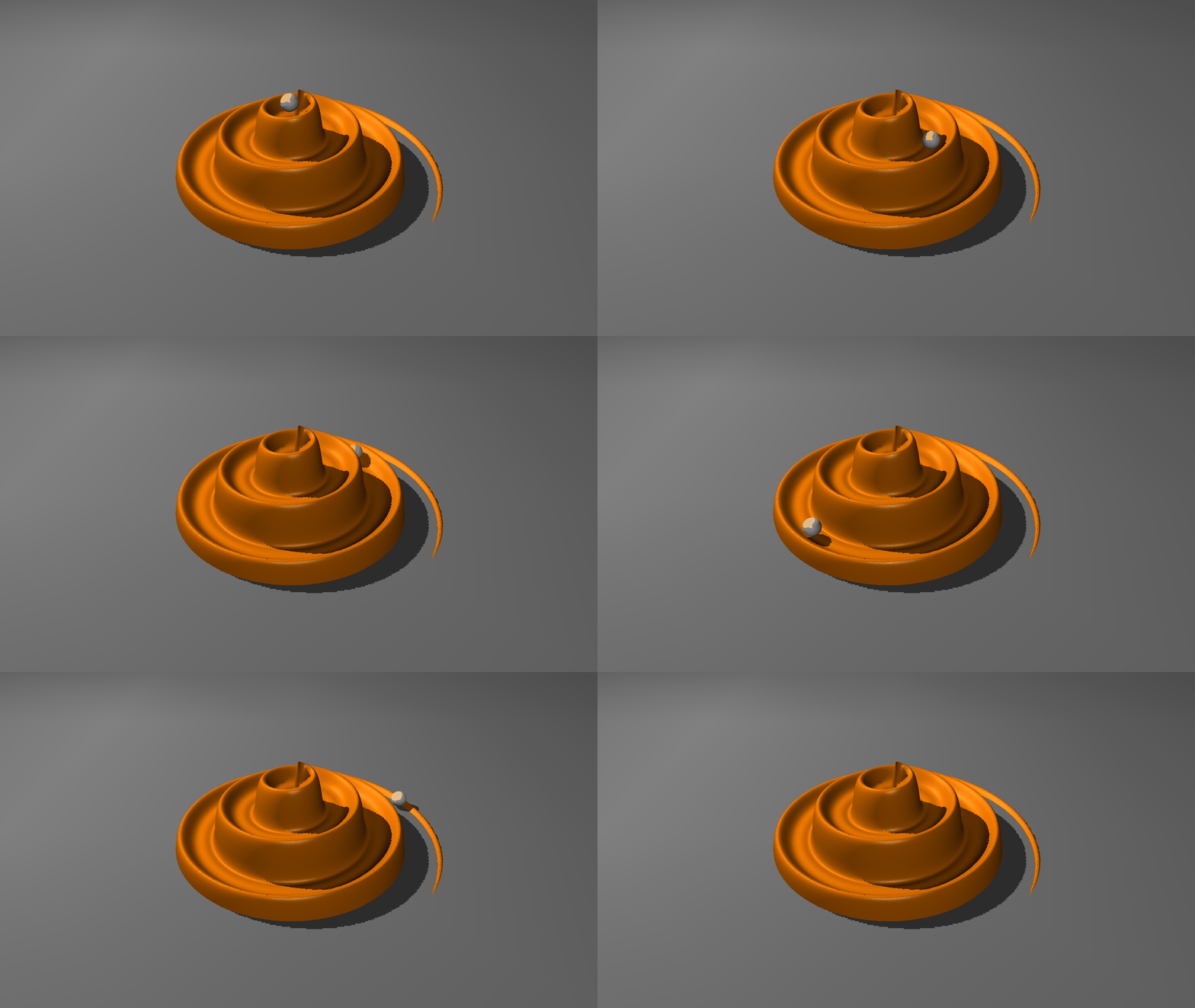
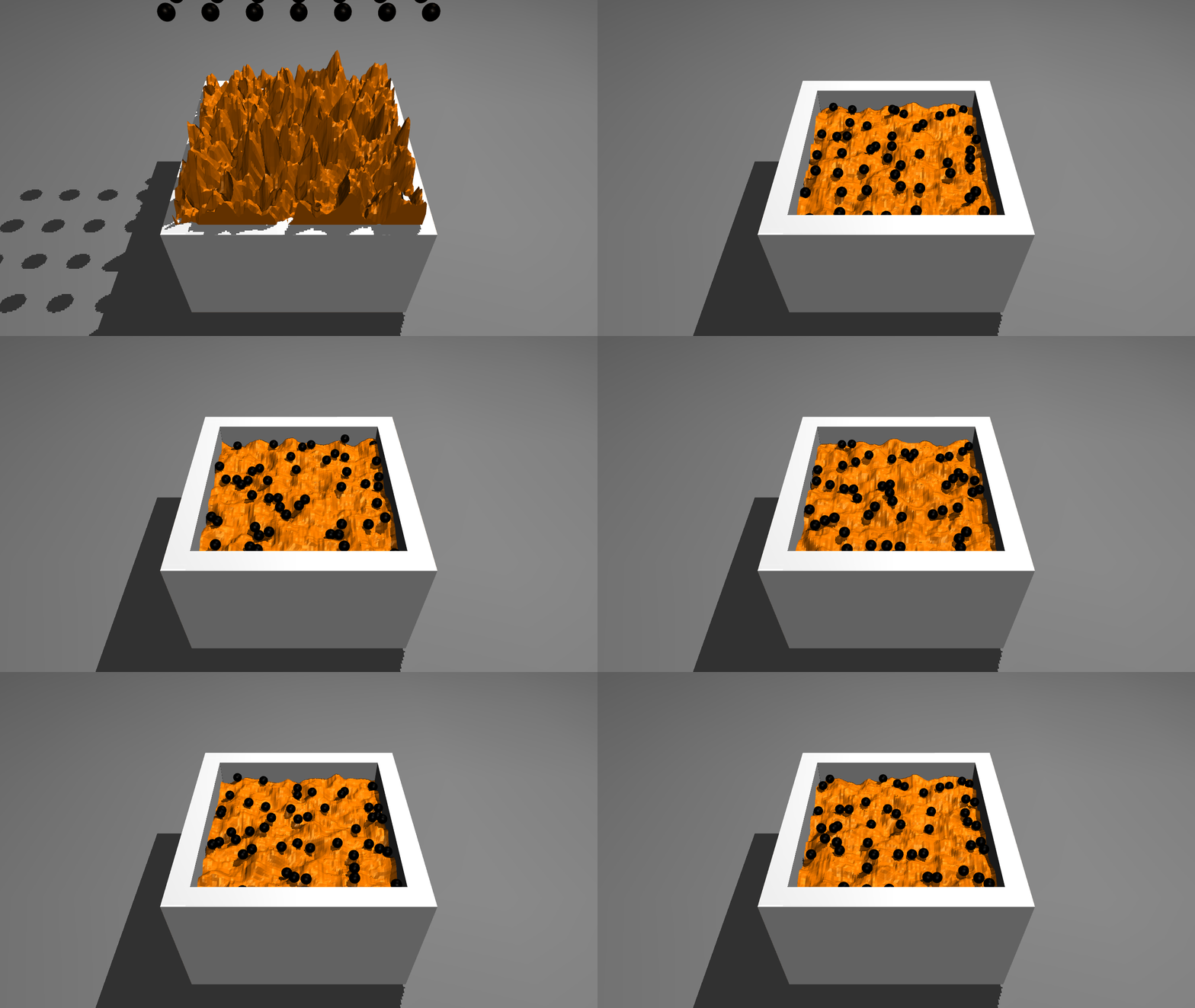
Terrain data can be edited at runtime by setting the hfield attribute.
Runtime Modification#>>> n_frames = 1000 >>> terrain = blue.perlin((n_frames, 100, 100), periodic=True) >>> ... # FURTHER TERRAIN PROCESSING >>> hfield = blue.geoms.HField(terrain=terrain, color='orange') >>> world.attach(hfield, copy=False) >>> for n in range(total_steps//20): >>> world.step(n_steps=20) >>> hfield.terrain = terrain[n % n_frames, ...]
- __init__(pos=[0.0, 0.0, 0.0], terrain=None, filename=None, x_length=1, y_length=1, z_length=1, height_offset=1, margin=0.0, gap=0.0, material=None, asset=None, x=None, y=None, z=None, **kwargs)[source]#
- Parameters:
pos (
list[int | float] | np.ndarray | None, optional) – Represents the position of the Thing. Changing this attribute also changes the propertiesx,yandz.terrain (
np.ndarray | list [ int | float ] | None) – The terrain data in the shape of a 2D array.filename (
str | None, optional) – The name for the file from which the HField data is loaded. The supported formats are.pngand.hf.x_length (
int | float, optional) – The length of the HField along the x-axis.y_length (
int | float, optional) – The length of the HField along the y-axis.z_length (
int | float, optional) – The length of the HField along the z-axis.height_offset (
int | float | None) – The offset in height for the terrain data points.margin (
int | float | None, optional) – A contact is considered active only if the distance between the two geom surfaces is below margin-gap.gap (
int | float | None, optional) – This attribute is used to enable the generation of inactive contacts, i.e., contacts that are ignored by the constraint solver but are included in mjData.contact for the purpose of custom computations. When this value is positive, geom distances between margin and margin-gap correspond to such inactive contacts.material (
blue.MaterialType, optional) – TheMaterialof the Geom. :class:`Textures <blueprints.texture.BaseTexture> are applied via Materials.asset (
blue.assets.HFieldAsset | None, optional) – The Asset of the HFieldname (
str | None, optional) – The user specified name might potentially be altered to avoid a naming conflict by appending an enumeration scheme.x (
int | float |np.int32 | np.int64 | np.float32 | np.float64 | None, optional) – If pos is not specified, this argument sets the X position coordinate.y (
int | float |np.int32 | np.int64 | np.float32 | np.float64 | None, optional) – If pos is not specified, this argument sets the Y position coordinate.z (
int | float |np.int32 | np.int64 | np.float32 | np.float64 | None, optional) – If pos is not specified, this argument sets the Z position coordinate.**kwargs – Keyword arguments passed to
super().__init__
- Return type:
None
- property pos: ndarray#
Modifying this attribute will create a new
blueprints.assets.MeshAssetobject if the previous Asset was the children of multiple parents. Otherwise the Asset get modified directly.- Return type:
np.ndarray | list[float | int]
- property terrain: ndarray#
Modifying this attribute will create a new
blueprints.assets.MeshAssetobject if the previous Asset was the children of multiple parents. Otherwise the Asset get modified directly.- Return type:
np.ndarray | list[float | int]
- property euler: ndarray#
Modifying this attribute will create a new
blueprints.assets.MeshAssetobject if the previous Asset was the children of multiple parents. Otherwise the Asset get modified directly.- Return type:
np.ndarray
- property size: ndarray#
Modifying this attribute will create a new
blueprints.cache.MeshCacheobject if the previous Cache was the children of multiple parents. Otherwise the Cache get modified directly.Note
Altering this attribute also changes the
verteciesattribute. To get the same effect without changing the vertecies, seescale.- Returns:
The size of the Mesh is calculated as the size of the Box with edges along the axes of the Meshes frame of reference, that captures all vertecies.
- Return type:
np.ndarray
- property x_length: float#
Length along the
X-axis of the HField.- Return type:
float
- property y_length: float#
Length along the
Y-axis of the HField.- Return type:
float
- property z_length: float#
Length along the
Z-axis of the HField.- Return type:
float
- property height_offset#
Height offset along the
Z-axis of the HField.- Return type:
float